
When site search actually works, it can drive 25 to 40% of a store’s total online sales.
If you’re a website owner or manager, you’ve likely come across the term “site search” and wondered, “What is site search?”
In this article, we’ll explain everything you need to know about site search and why it can have such a big impact on the customer experience.
A search bar may look simple, but the experience behind it can make the difference between a customer finding what they need and leaving your site.
What is Site Search?
Site search is a website feature that allows users to search for specific information, products, or content within that website.
Think of it as having a built-in search engine tailored to a particular website. Instead of navigating through menus and pages, users can simply enter their queries, and the site search tool does the rest, quickly delivering relevant site search results.
This functionality streamlines the user experience, just like using Google to find information on the internet.

Why is Site Search Important?
Now that we’ve explained the site search definition, let’s take a look at why site search is so important for websites.
Site search plays a pivotal role in websites for several compelling reasons:
1. Enhances User Experiences
Site search significantly improves user experiences by enabling visitors to quickly locate what they’re looking for. This efficiency fosters satisfaction and engagement, encouraging users to return to the site.
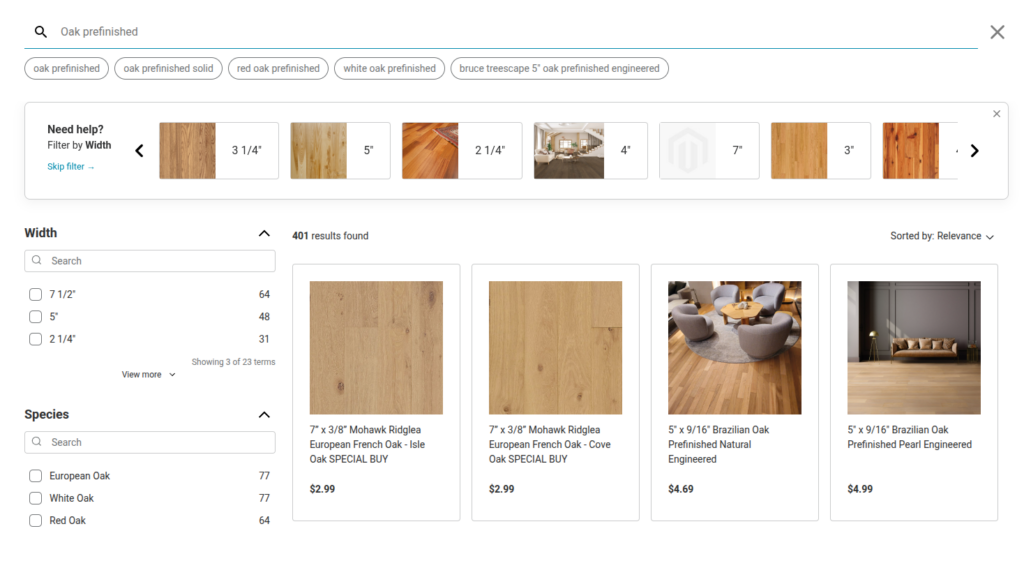
Example: Hurst Hardwoods was running into a common problem: Shopify’s default search couldn’t handle their range of product variations, so customers kept landing on irrelevant results or none at all. After switching to Doofinder, search started understanding variation-based queries, surfacing the right item instantly instead of forcing customers to dig through menus.
Result: Click-through rate up 62.9%, with zero-result searches down to just 1.4%
2. Reduces Bounce Rate
High bounce rates, where visitors quickly exit a website, can be detrimental to its success. Site search helps reduce bounce rates by providing quick access to relevant content, reducing user frustration.
Example: Freshly Cosmetics found that their default search engine wasn’t giving customers the results they expected, and shoppers were bouncing before finding what they needed. After implementing Doofinder, search usage tripled and the team started using real time search data to guide product decisions, even identifying demand for products they didn’t yet carry.
Result: Bounce rate down 42%, page views up 47%
3. Boosts Conversions
For eCommerce websites, site search is a conversion booster. When shoppers effortlessly find products they’re looking for, the likelihood of making a purchase increases. Similarly, content-driven websites benefit from increased engagement and conversions when visitors can easily access valuable content.
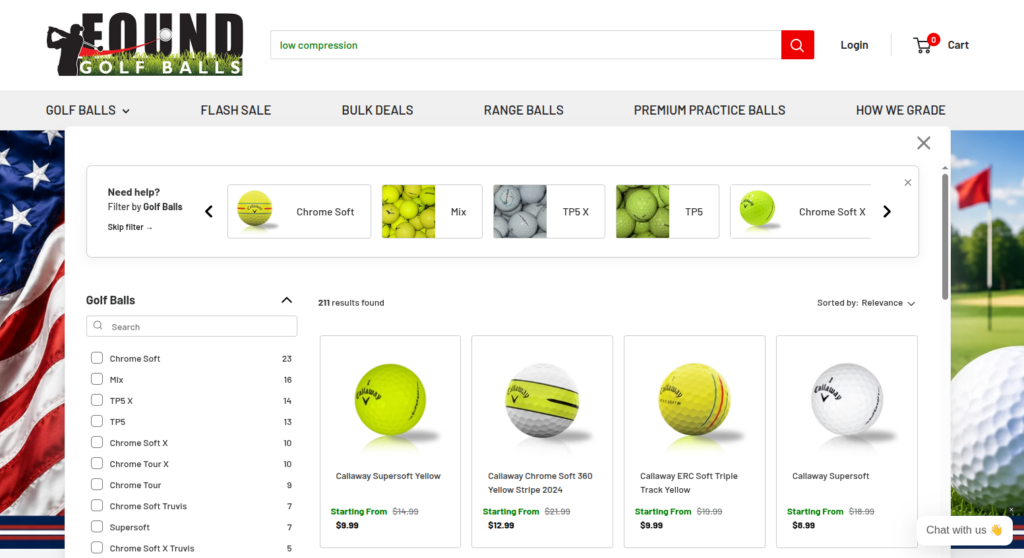
Example: Found Golf Balls sells a catalog full of near identical looking products that only differ by brand, model, and performance attributes like compression. Before Doofinder, customers had to already know the exact product name to find what they wanted. Now, a search for something like “low compression” surfaces the right models first, even though none of those product titles contain that exact phrase.
Result: Search now drives 25 to 40% of total sales, with 83.9% of searches leading to a click
4. Improves SEO
Search engines prioritize websites that offer an excellent user experience. A robust site search function can contribute to improved SEO rankings by reducing bounce rates and increasing user engagement.
5. Scales With Your Catalog
As your website grows, so does the volume of content or products. Site search ensures that users can access your expanding offerings without feeling overwhelmed.
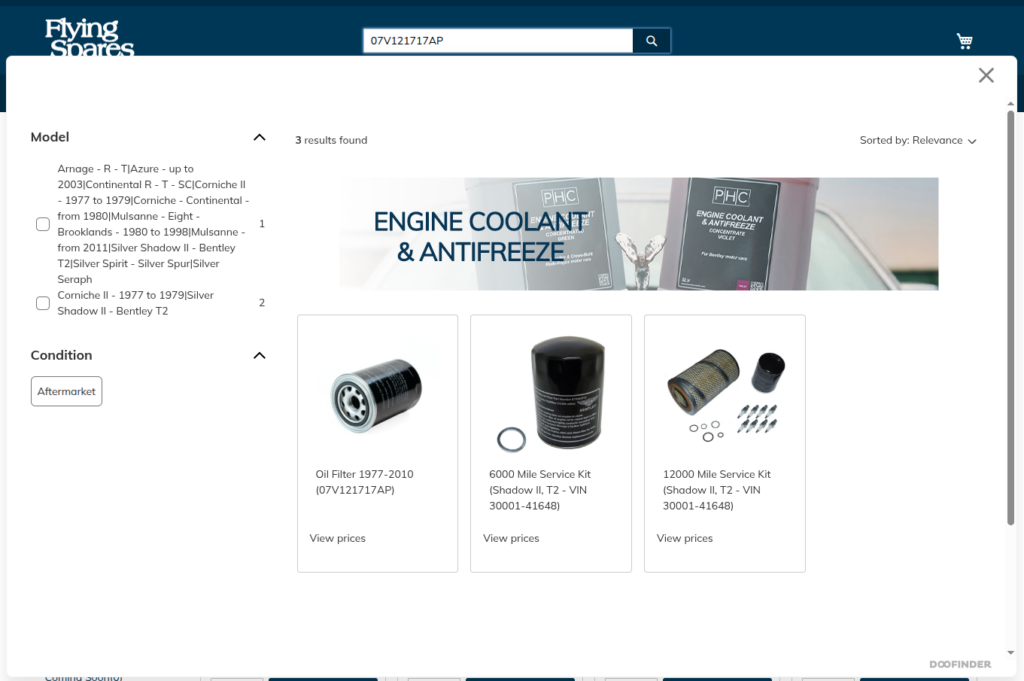
Flying Spares stocks over 240,000 parts spanning nearly 80 years of Rolls-Royce and Bentley models. Because they implemented advanced site search, a search for one exact part number returns not just that product, but every kit it belongs to, helping customers find what they need in a catalog that size.
Result: 63% click-through rate
6. Creates a Competitive Edge
Providing an exceptional site search experience sets you apart from competitors. Users are more likely to return to websites where they can easily find what they need.
7. Surfaces Data-Driven Insights
Every search your customers make reveals what they’re actually looking for, and where your search experience is falling short. We break down exactly what this data looks like, and how to act on it, later in this article.
How Does Site Search Work?
Have you ever wondered how to use site search? Let’s take a closer look at the mechanics behind this digital convenience:
- Input: Users type queries into a website’s search box, such as “red shoes” or “shipping policy.”
- Searching: The website’s search engine scours its database for content matching the query, including text, images, and other information.
- Sorting: A special eCommerce search algorithm ranks results by relevance, presenting the most relevant content at the top.
- Displaying: Users receive a list of clickable links or product listings as results, with the most relevant ones prominently featured.
- User Interaction: Users can click on results, refine their search, or use filters to narrow down their choices.
- Learning: The search engine learns from user behavior. If a particular link gets many clicks, it may rise in the rankings in subsequent searches.
- Improvement: Website owners use data and feedback to enhance the search, such as adding more content or fine-tuning the ranking algorithm.
Types of eCommerce Businesses That Benefit Most from Site Search
Site search isn’t one size fits all. The right approach depends less on your industry and more on the shape of your catalog. Here’s where it tends to make the biggest difference.
1. Large, High-Variant Catalogs
If your products come in a lot of variations, think size, color, model, or part number, search has a tough job to do. Customers need to land on the exact variant they want, fast. This is common in sporting goods, marine and auto parts, and home goods.
2. Intent and Attribute Driven Shopping
Some shoppers don’t search by product name at all. They search by what they need: “hydrating,” “sleep support,” “gift for him.” For search to work here, it has to understand intent, not just match keywords. This shows up a lot in beauty, wellness, and specialty retail.
3. Technical and Niche Terminology Catalogs
Some catalogs come with their own vocabulary: specs, compatibility requirements, flavor names, dimensions. Generic search often misses these entirely. Synonym handling and technical precision make the difference here.
4. Multi-Vendor and Marketplace Sites
When products span multiple sellers or overlapping categories, search stops being a backup to browsing. It becomes the main way customers get around the site.
What Site Search Data Actually Tells You
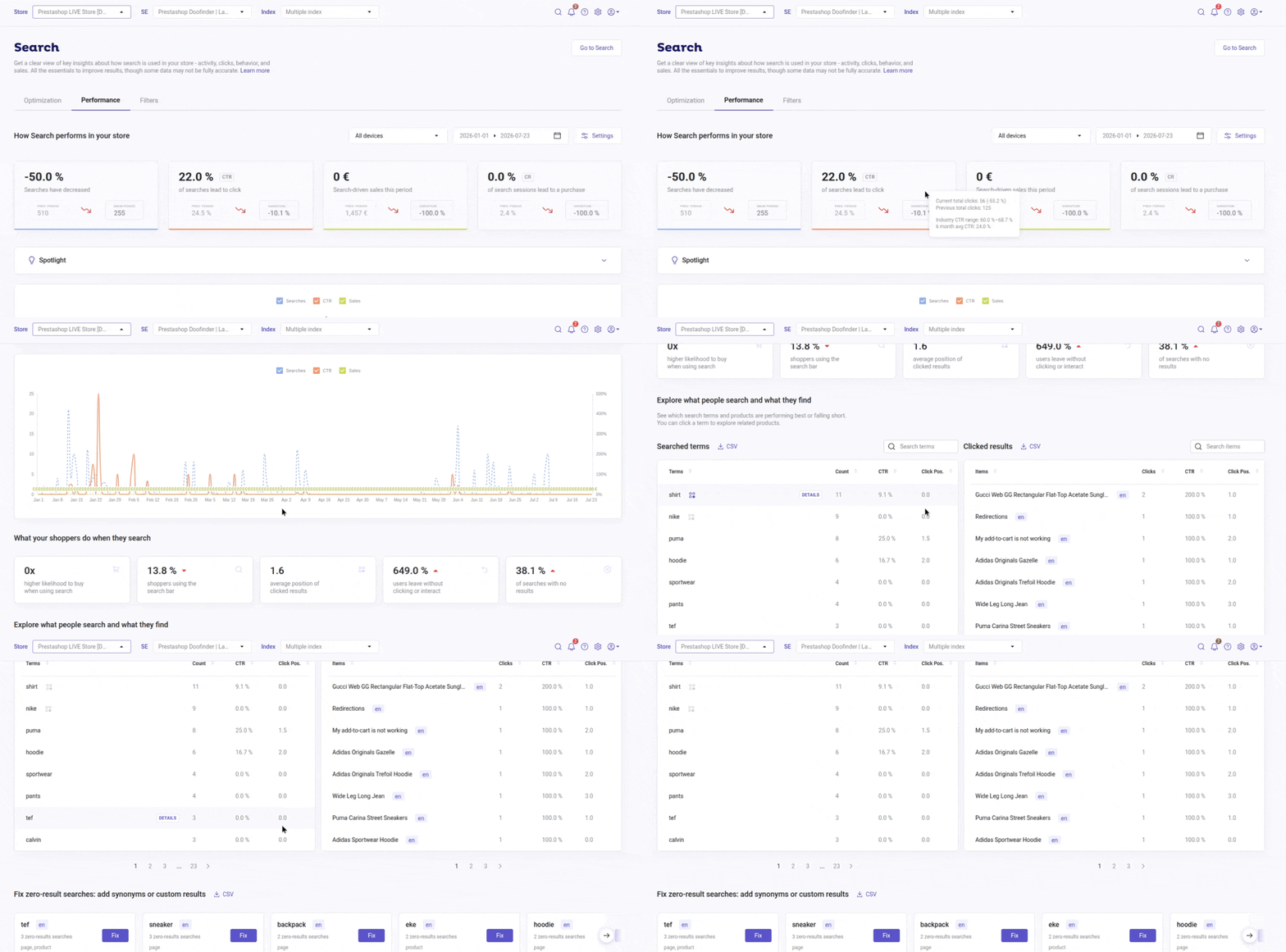
Every search your customers type is a signal, and site search platforms track that signal in ways generic web analytics never will. Here’s what a good analytics dashboard should show you.
Top queries
The exact terms customers are searching for, ranked by volume. This tells you what your customers actually want, in their own words, not the words you used when you wrote your product titles.
Zero-result queries
Every search that returned nothing. This is the clearest list of missed opportunities you’ll ever get. If dozens of customers are searching for something your catalog doesn’t return, that’s either a product gap to fill or a synonym gap to fix.
Click-through rate
The percentage of searches that lead to a click on a result. A low CTR on a specific query usually means the results don’t match what the customer meant, even if something technically matched the keyword.
Conversion by query
Not every search is equal. Some queries convert into sales far more often than others. Knowing which ones do lets you prioritize fixing the queries that are actually costing you revenue, instead of guessing.
Does Your Website Need Site Search?
Now that we’ve explored the ins and outs of site search, you might be wondering whether your website truly needs this feature.
While site search can undoubtedly benefit a wide range of websites, it’s essential to assess your specific circumstances to determine if it’s needed.
Here are some key considerations:
- Content Complexity: If you have an extensive catalog of products, a large library of articles, or a diverse range of content, site search becomes increasingly valuable.
- User Engagement: Are your users frequently navigating between pages, looking for specific items, or seeking information? If so, site search can streamline their experience and encourage them to stay longer, exploring more of what your website has to offer.
- eCommerce Ambitions: If you run an eCommerce website, site search is almost a necessity. It significantly impacts conversion rates by enabling customers to find products quickly.
- Data Insights: Site search usage generates valuable data on what visitors are searching for, what they find, and what they don’t. This data can inform content strategies, product offerings, and marketing efforts.
- Competitive Landscape: If your competitors offer site search and you don’t, you may be at a disadvantage. Users tend to prefer websites that make their search process easier and more efficient.
- Website Growth: As your site expands with more content, products, or services, site search becomes increasingly beneficial. It ensures that users can navigate your growing offerings without becoming overwhelmed.
Ultimately, the decision to implement site search should align with your website’s goals and the needs of your audience. If you determine that site search can enhance the user experience, increase engagement, and drive conversions, it’s likely a wise investment.
Choosing the Right Site Search for Your Website
Selecting the ideal site search option for your website requires careful consideration of various factors:
1. Analytics: Choose a site search function that provides detailed search engine analytics and insights into user behavior, search queries, and conversion rates. This data enables continuous optimization.
2. Functionality: Ensure your site search is robust and can handle various types of content, from products to articles. It should also support multi-language and multi-region capabilities if needed.
3. Customization: The ability to customize the search interface to align with your website’s design and branding is essential for a seamless user experience.
4. Reliability: Opt for a web site search solution that is reliable and offers fast site search results, even during traffic spikes.
These factors collectively contribute to an efficient, user-friendly search experience on your website. By choosing wisely, you can not only meet but exceed user expectations, ultimately driving the success of your online presence.
Native Platform Search vs. a Dedicated Site Search Tool
Not sure if your platform’s built-in search is holding you back? Here’s exactly where it tends to fall short, and what a dedicated solution adds instead.
Native Platform Search vs. Doofinder
Tap a column header or a cell to see details below.
| Feature | Native Search i | Doofinder i |
|---|---|---|
| Typo tolerance | ● Limited | ● Built in |
| Synonym handling | ● Manual, if available | ● Automatic + custom |
| Autocomplete | ● Basic or none | ● Predictive |
| Search analytics | ● Minimal to none | ● Full dashboard |
| Personalization | ● None | ● AI-driven |
| Setup time | ● Instant | ● Under 5 minutes |
Tap a column header or a cell above to see the details here.
6 Ways to Upgrade Your Site Search Function
Ensuring your web site search offers essential functionalities is pivotal to keeping your users engaged and satisfied. Let’s explore six fundamental site search features, or search engine features, that can make a significant difference in the user experience and the success of your website:
1. Customizable Search Interface:
A customizable search interface allows you to tailor the look and feel of your site’s search bar to match your website’s design, making it more visually appealing and user-friendly.
2. Autocomplete Search Suggestions:
Autocomplete or predictive search suggestions help users find what they’re looking for faster by suggesting relevant queries as they type.
3. Personalized Recommendations:
Provide users with personalized product recommendations based on their search history and preferences, increasing the chances of conversion.
4. Product Card Tags:
For eCommerce websites, product cards should display essential information, images, and links directly in the site search results, making it easier for users to make informed decisions.
5. Visual & Voice Search:
Incorporating visual and voice search capabilities caters to a broader audience and keeps your site on the cutting edge of technology.
6. Search Filters:
Search filters enable users to refine site search results by criteria like price, category, or date, helping them narrow down their choices quickly.
These six site search upgrades collectively enhance your site’s search functionality, offering users a seamless, efficient, and enjoyable experience.
By integrating these essentials into your website’s search, you not only meet but exceed user expectations, contributing to the overall success of your online business.
Unlock the Power of Site Search with Doofinder
Getting a site search up and running with Doofinder is quick and easy. Start by signing up for a free trial and then follow the setup instructions to seamlessly integrate Doofinder into your eCommerce platform or custom website. If you ever need any help, feel free to schedule a demo with one of our eCommerce specialists.
Once everything is in place, you have the flexibility to fine-tune search settings, experiment with filters, and leverage analytics tools to better understand and analyze your customers’ behavior.
The best part is that Doofinder doesn’t just add a site search to your website; it’s an all-in-one solution that enhances your website’s user experience. With powerful merchandising tools, insightful business analytics, and cutting-edge AI-personalization, you’re not just searching; you’re transforming the way your users interact with your site.
So, why wait? Upgrade your site search today and give your customers a search experience that keeps them engaged and drives more sales for your business.
Frequently Asked Questions on Ecommerce Site Search
Site search is a built-in search engine for your own website. Instead of digging through menus and categories, visitors type what they’re looking for and get relevant results right away, similar to using Google, but limited to your own catalog or content.
Google crawls and ranks pages from across the entire web. Site search only looks at what’s inside your own store. That means it has to understand your specific products, inventory, pricing, and terminology in a way general web search never has to, and it has full control over what gets surfaced, since there’s no competing content from other sites in the results.
Yes, consistently. Shoppers who use search already know what they want, so they convert at a much higher rate than shoppers who only browse. Across Doofinder’s customers, this shows up again and again: Blue Banana increased conversion by 16%, SIM Yamaha reached a 24.9% search conversion rate, and Found Golf Balls now drives 25 to 40% of total sales through search alone.
It depends on the provider and the size of your catalog. Built-in platform search (Shopify’s or WooCommerce’s default, for example) is free but limited in what it can do. Dedicated solutions typically price based on usage, catalog size, or search volume, and cost scales with the features you add, like personalization, analytics, or AI-powered relevance.
For Doofinder’s full pricing list, see our pricing page.
Start with the basics: typo tolerance, synonym recognition, and filters that match how customers actually describe your products, not just how you’ve labeled them internally. From there, look at your zero-result searches regularly, since they’re usually the clearest signal of where relevance is breaking down. Search analytics can also show you which queries convert and which don’t, which tells you exactly where to focus first.
